
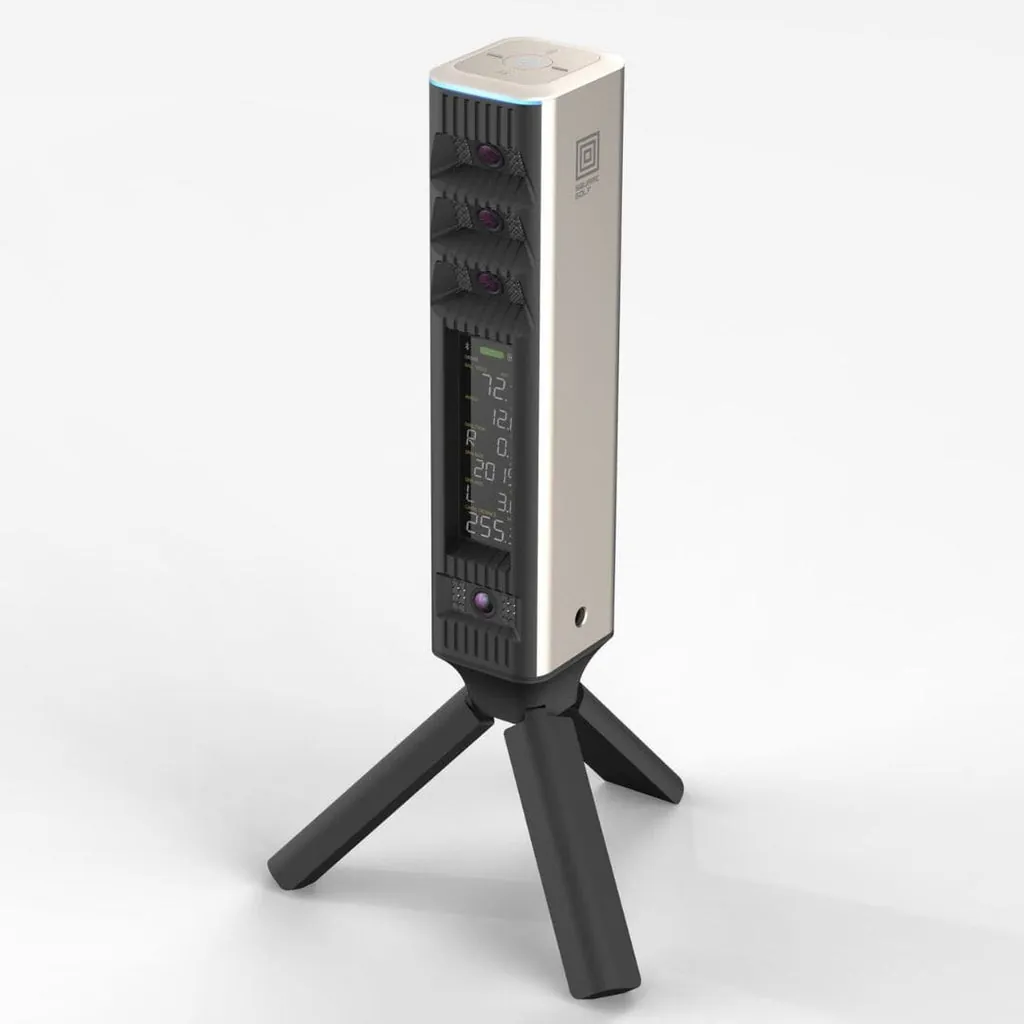
This comparison is unusually simple. Two camera-based launch monitors. Both portable. Both no-subscription. Both work indoors and outdoors. Both have built-in displays.
But they make opposite tradeoffs on the two things that matter most: software compatibility and club data.
The Omni gives you GSPro and charges $1,599. The LaunchBox gives you stickerless club data and charges $2,999.
You can’t have both at this price. That’s the whole comparison in one sentence. Everything below is just unpacking which tradeoff makes more sense for you.
The Quick Spec Sheet
| Feature | Square Golf Omni | TruGolf LaunchBox |
|---|---|---|
| Price | $1,599 | $2,999 |
| Technology | 4-camera photometric | 2-camera photometric |
| Data metrics | 17 (ball + club with stickers) | 21 (ball + club without stickers) |
| Club data | Requires stickers (face + shaft) | Measured without stickers |
| GSPro support | Yes, native and seamless | NO — E6 only |
| E6 Connect support | Yes (via configuration) | Yes (27 courses included, owned) |
| Built-in display | 4.3“ LCD (color) | E Ink (sunlight readable) |
| Battery | 5-7 hours, replaceable | 4-6 hours, not replaceable |
| Indoor use | Excellent, 12 ft room depth | Excellent, 10 ft room depth |
| Outdoor use | Yes, on real grass (IP44) | Yes, infrared sensors handle sun |
| Weight | ~1.5 lbs | 2.7 lbs |
| No marked balls | Yes | Yes |
| Short game | Good | Excellent |
| Putting | Measures spin, reads putts | Basic distance only |
| Subscription | $0 (ever) | $0 (27 courses included, E6 APEX optional) |
| Included software | GSPro + E6 compatible, 1,000 free course credits | 27 owned E6 Connect courses |
| Launch status | Preorder (Late Summer 2026) | Shipping now |
The $1,399 Question
The Omni costs $1,599. The LaunchBox costs $2,999.
That $1,400 difference buys a few things. Better club data fidelity (the LaunchBox’s stickerless system is genuinely innovative). A bigger software library included out of the box (27 owned E6 courses vs 1,000 credits on Square’s platform). A more established company pedigree — TruGolf has been building commercial sims for a decade.
But it also buys you into E6. And that’s the part that hurts.
The Omni at $1,599 gives you GSPro. The LaunchBox at $2,999 gives you E6. GSPro is the best sim software in the world. E6 is good. Those two statements are not equally valuable.
Software: GSPro vs E6 Only
This is the headline. The Omni supports GSPro natively — plug it in, install GSPro, you’re playing. The LaunchBox does not support GSPro at all. It is an E6-only device, and that’s not changing.
If you don’t know why that matters, here’s the short version: GSPro has 4,000+ courses, an active modding community, the best course quality in the business, and the most frequent update schedule. It’s the software that 80% of informed home sim buyers choose. It costs $250/year and it’s worth every penny.
E6 Connect is fine. The 27 courses included with the LaunchBox are real licensed venues — Pebble Beach, St. Andrews, Oakmont, Bay Hill, Kapalua. The E6 APEX upgrade ($150-450/year) unlocks 3,000+ on-demand courses. The graphics are good. The multiplayer works. It’s a legitimate sim platform.
But it’s not GSPro. And most buyers in this price range — $1,500 to $3,000 — are informed enough to know the difference.
Here’s what the decision looks like:
If you want GSPro: buy the Omni. It costs $1,399 less and gives you the best sim software on the market. That’s not a close call.
If you’re happy in E6: the LaunchBox is actually compelling. The 27 owned courses are a real value — you own them forever, no subscription. The APEX upgrade is optional. The course library at the Play tier ($300/yr) is solid. And the short game performance is better than the Omni’s.
But you’re paying $1,399 more for the privilege of being locked into E6. That’s the tradeoff I want you to feel.
Club Data: The LaunchBox’s One Unfair Advantage
The LaunchBox measures club path, face angle, and attack angle without stickers. No reflective dots. No tape. No club stickers that need replacing every few sessions.
This is genuinely unique at this price. The Foresight GC3 does it at $5,249. The Uneekor Eye Mini Lite needs stickers at $2,199. The SkyTrak ST MAX needs stickers at $1,995. And the Omni — yes — needs stickers for club data.
The Omni uses four cameras to measure ball data — ball speed, launch angle, spin rate, carry distance — with impressive accuracy. But club data requires applying stickers to your clubface and shaft. The stickers last maybe 20-30 swings before you need to replace them. It’s friction. Not a dealbreaker, but it’s friction.
The LaunchBox’s stickerless system is in beta, per TruGolf’s own documentation. It works — multiple reviewers confirm it — but it’s not as mature as the ball data. You’ll get directional feedback accurate enough to tell if you’re coming over the top or flipping. You won’t get sub-degree precision on face angle.
The question: how much do you care about club data without stickers? If you’re a data-driven practicer who needs face angle and club path on every swing, and you hate dealing with stickers, the LaunchBox is the only camera-based option under $3,000 that gives you that. That’s a genuine differentiator.
If you’re a normal home sim owner who wants to play courses, track your handicap, and occasionally check your swing path — the Omni’s stickered club data is good enough. Apply the stickers every third session, check your numbers, remove them. It’s 30 seconds of friction per use.
Accuracy: Both Are Excellent
The Omni has four cameras. The LaunchBox has two. More cameras does not always mean better accuracy, but in this case, it means the Omni captures more data from more angles simultaneously.
Independent testing (PlayBetter, National Club Golfer, Practical Golf) confirms the Omni delivers carry distance within 2 yards of the $5,249 GC3 and spin rates within 50 RPM. That’s exceptional for $1,599.
The LaunchBox’s accuracy is also solid — PlayBetter tested it within 2-3 yards of a radar unit on carry, and spin numbers within 5% on mid-irons and wedges. The short game performance is notably better than the Omni: chips and partial wedges read reliably, which is a weakness for most launch monitors at this price.
Accuracy edge: Omni for ball data. LaunchBox for short game.
Portability and Display
Both units have built-in displays, which is rare at their respective prices. The Omni has a color 4.3-inch LCD. The LaunchBox has an E Ink screen. The Omni’s display is better for indoor use. The LaunchBox’s E Ink is better for outdoor use (completely readable in direct sunlight, uses almost no battery).
Both are portable. The Omni is lighter (~1.5 lbs) with a replaceable battery (5-7 hours). The LaunchBox is heavier (2.7 lbs) with a non-replaceable battery (4-6 hours). Both work indoors and outdoors, though the Omni’s outdoor capability is more tested (it’s the only sub-$2K camera unit that works on real grass, per multiple reviews).
The Omni is IP44 splash resistant. The LaunchBox doesn’t have an IP rating, but its infrared sensors handle direct sunlight well.
Portability edge: Omni for weight and replaceable battery. LaunchBox for E Ink display readability.
Putting and Short Game
The LaunchBox handles chips and partial wedges better than anything at this price. Multiple reviewers confirm this — it’s the device’s second-best feature after stickerless club data. If you practice short game more than anything else, the LaunchBox is genuinely better than the Omni here.
Putting is the reverse. The Omni reads putts and measures spin on the green. The LaunchBox reads basic distance and direction only. If putting practice matters to you, the Omni is the better choice.
Who Should Buy the Square Golf Omni
Buy the Omni if:
- You want GSPro. This is the main one. Most informed buyers in this price range want GSPro, and the Omni gives it to you natively.
- You want the most cameras for your money. Four cameras at $1,599 is a better hardware deal than two cameras at $2,999.
- You want to save $1,399. That’s a lot of money. It buys three years of GSPro subscription ($750), a Carl’s Place Standard screen ($369), and lunch.
- You want outdoor range capability on real grass. The Omni handles this. Most camera-based units don’t.
- You want putting data as part of your sim experience.
Skip the Omni if:
- You absolutely need club data without stickers. The Omni can’t do it. If stickers are a dealbreaker, the LaunchBox is your only option at this price.
- You’re a scratch golfer who needs sub-degree club data precision. The Omni’s stickered club data is good but not GC3 good.
- You’re committed to the E6 ecosystem and don’t care about GSPro. In that case, the LaunchBox’s 27 owned courses are a better value than the Omni’s 1,000 credits.
Who Should Buy the TruGolf LaunchBox
Buy the LaunchBox if:
- Club data without stickers is non-negotiable. This is the product’s reason for existing. If you hate stickers and you want face angle on every swing, this is the best option under $3,000.
- You’re an E6 loyalist. You prefer E6’s graphics, you like its course selection, you have friends on the platform. The 27 owned courses are a genuine value.
- Short game practice is your priority. The LaunchBox handles chips and partial wedges better than anything at its price.
- You want the simplest no-subscription sim experience. Open the box, set it up, hit balls. No app store, no credit card, no renewal reminders.
Skip the LaunchBox if:
- You want GSPro. I keep coming back to this because it’s the deciding factor. If GSPro is in your future — and it should be for most buyers — the LaunchBox cannot give it to you.
- You want the best value. The Omni costs $1,399 less, has more cameras, supports more software, and produces ball data within margin of the GC3. The LaunchBox’s stickerless club data is genuinely innovative, but it’s a niche advantage for a $1,400 premium.
- You want putting as part of your practice routine. The LaunchBox’s putting is basic.
The Verdict
The Square Golf Omni wins this comparison for the vast majority of buyers.
It costs $1,399 less. It has four cameras instead of two. It supports GSPro natively. It works on real grass outdoors. It has a replaceable battery. It reads putts. And its ball data tests within 2 yards of the GC3 — the $5,249 accuracy benchmark.
The LaunchBox has one thing the Omni doesn’t: stickerless club data. If that’s worth $1,399 to you — and for some buyers, especially data-driven practice golfers, it genuinely might be — the LaunchBox is your device.
But for the normal home sim buyer who wants to play GSPro courses, track their handicap, and occasionally check their swing path, the math is simple.
Buy the Square Golf Omni ($1,599). Pocket the $1,399. Spend $250 of it on GSPro. Use the rest to upgrade your impact screen or buy a nicer mat. You’ll have a better sim setup and you won’t miss the stickerless club data.
The LaunchBox is for a specific buyer with a specific need. The Omni is for everyone else.
Related reading:
- Full Square Golf Omni Review — the four-camera disruptor in depth
- Full TruGolf LaunchBox Review — stickerless club data up close
- Square Golf Omni vs Foresight GC3 — $1,599 unit vs the $5,249 benchmark
- Best No-Subscription Launch Monitors 2026 — the complete list
- Best Stickerless Launch Monitors 2026 — where the LaunchBox sits in that category
Need the full picture on costs? 5-Year Total Cost of Ownership → with software subscriptions, mats that wear out, and the hidden expenses nobody talks about.