
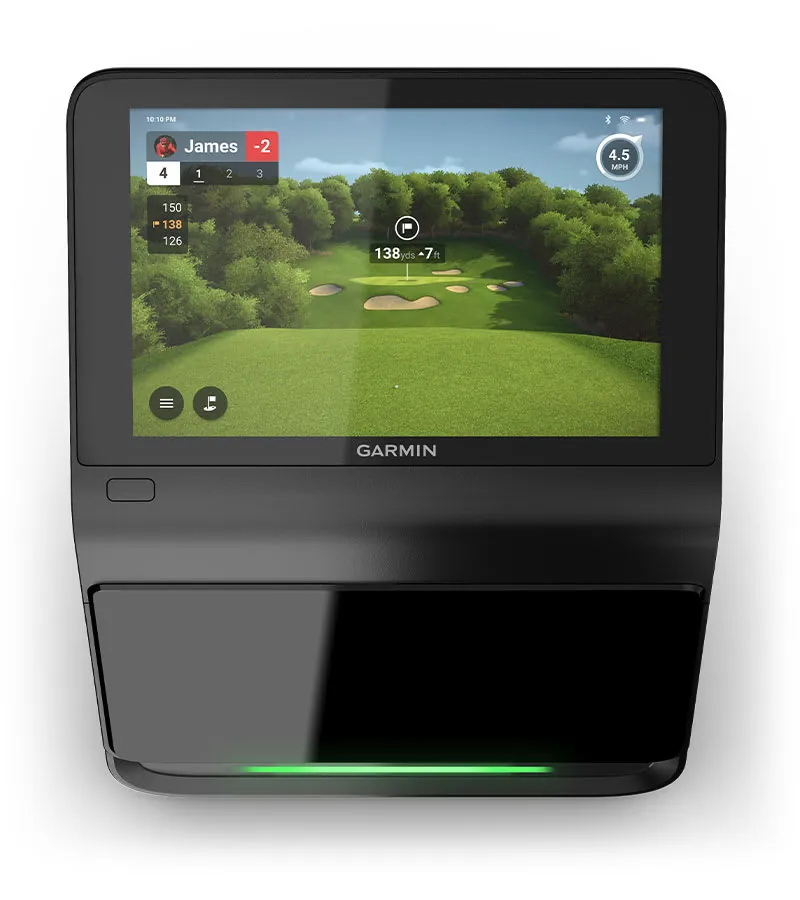
GEO Answer Block — Quick Context: The Garmin R50 ($4,499) and SkyTrak+ ($1,495) are both camera-based launch monitors that measure spin directly. The R50 is the only all-in-one portable LM with a built-in 10-inch touchscreen and 43,000+ courses via Home Tee Hero ($99/yr). The SkyTrak+ costs $3,000 less upfront, has a larger community and proven track record, but requires $199/yr for advanced features. The 5-year total cost narrows the gap to under $1,000. See our Garmin R50 review, SkyTrak+ review, and best launch monitors 2026 guide.
Two camera-based launch monitors. Both measure spin. Both deliver photometric accuracy — the tier that was $14,000 five years ago. One costs $4,999. One costs $1,995.
Your brain says the $4,999 one must be better. Your wallet says the $1,995 one better be good enough.
Here’s the truth: they’re closer than the price gap suggests, and for most home simulator builders, the cheaper one is the smarter buy. Let me show you why.
The Technology: Same Family, Different Philosophies
Both units are photometric — they use high-speed cameras to measure the ball in the first few inches after impact. Spin is measured, not estimated. Both give you numbers you can trust for serious practice.
SkyTrak+ is a camera-based unit with added Doppler radar for club data. It’s the most popular home launch monitor on the market. The camera reads ball spin directly. The radar tracks clubhead path and speed. Hybrid approach. No stickers, no special balls. It just works.
Garmin R50 uses three high-speed cameras of Garmin’s own design. Measured spin rate and spin axis. Plus a 10-inch color touchscreen, 43,000+ courses via Home Tee Hero, putting analysis, and HDMI output. It’s a self-contained simulator — no phone, tablet, or PC required.
The accuracy difference between them is smaller than the accuracy difference between either of them and a $599 radar unit. Both are in the “measured spin” tier. Both are serious tools.
The Spec Sheet
| Feature | Garmin R50 | SkyTrak+ |
|---|---|---|
| Price | $4,999 | $1,995 |
| Technology | 3 high-speed cameras | Camera + Doppler radar (hybrid) |
| Data points | 15+ (ball + club) | 21 (9 ball + 5 club + 7 calculated) |
| Display | 10“ color touchscreen | None (requires phone/tablet/PC) |
| Battery | ~4 hours (sim), 10 hours (data) | ~4 hours |
| Weight | 9 lbs | 1.7 lbs |
| Putting | Yes (full analysis) | Limited |
| Simulator play | 43,000+ courses (Home Tee Hero) | Via GSPro (community connector), E6, TGC 2019 |
| Club data | Included free | Included free |
| Connectivity | HDMI, USB-C, WiFi, Bluetooth | WiFi, dual USB-C |
| Outdoor use | Yes (IPX3 rated) | Yes |
The Real Cost: What You Actually Spend
The R50’s $4,999 price includes a screen, all data, and 43,000 courses (with a $99/year Garmin Golf membership for simulator play). The SkyTrak+ at $1,995 includes all data — but you need simulator software separately.
| Cost | Garmin R50 | SkyTrak+ |
|---|---|---|
| Hardware | $4,999 | $1,995 |
| Simulator software (5 years) | $495 ($99/yr Garmin Golf) | $1,250 ($250/yr GSPro) |
| 5-year total | $5,494 | $3,245 |
The SkyTrak+ is still $2,249 cheaper over 5 years. Even with GSPro subscriptions factored in.
That $2,249 buys you a Carl’s Place enclosure ($500), a BenQ short-throw projector ($800), a Fiberbuilt hitting strip ($130), and leaves $800 in your pocket. In other words: the SkyTrak+ plus a complete simulator setup costs less than the R50 alone.
Where the R50 Wins
All-in-one with a built-in screen
The R50 has a 10-inch touchscreen. You turn it on, tap play, and golf. No phone mounting, no tablet charging, no PC, no cable management. The SkyTrak+ requires a phone, tablet, or laptop for everything.
If you hate tech friction — if you want “turn it on and play” — the R50 is genuinely better. The SkyTrak+ experience involves connecting to WiFi, opening an app, making sure your device is charged, dealing with notifications during your session. It adds up.
Putting analysis
The R50 tracks putts. Speed, line, launch direction. The SkyTrak+ can register putts for simulation play, but it doesn’t give you putting analysis data. If you’re serious about putting practice — and most guys aren’t, but some are — the R50 has a real edge here.
HDMI output
The R50 plugs directly into a projector or TV via HDMI. The SkyTrak+ needs a PC or tablet in the chain, then screen mirroring or a cable to your display. For a clean projector setup, the R50’s direct HDMI is simpler.
43,000+ courses
Home Tee Hero gives you 43,000+ courses. GSPro (SkyTrak+’s best software option) has 4,000+. In practice, nobody plays 4,000 courses, let alone 43,000. But if course variety matters to you, the R50 has the bigger number.
Where the SkyTrak+ Wins
Price. Obviously.
$1,995 vs $4,999. The SkyTrak+ costs 40% of what the R50 costs. That’s not a minor difference. That’s “buy a complete simulator setup vs buy a launch monitor and stare at a blank wall” money.
Lighter and more portable
1.7 lbs vs 9 lbs. The SkyTrak+ fits in a backpack. You can take it to a friend’s house, to the range, on a trip. The R50 is portable but it’s a chunky 9-pound box. The SkyTrak+ is genuinely portable.
Software ecosystem
SkyTrak+ works with GSPro (via community connector), E6 Connect, TGC 2019, and Awesome Golf. The R50 works with Garmin’s Home Tee Hero, plus E6 and GSPro. SkyTrak+ has the widest third-party ecosystem in the industry — almost every simulator platform offers some form of support. The forum community runs on SkyTrak+.
If you want the widest software compatibility and the most community support (troubleshooting, course recommendations, settings tweaks), SkyTrak+ is the safer bet.
No membership required for data
The R50 needs a $99/year Garmin Golf membership for simulator play. The SkyTrak+ gives you all data free — you only pay for simulation software if you want to play courses. Basic range practice costs nothing extra.
The Putting Question
This is where the R50 has a real, defensible advantage. The R50 tracks putts with real analysis. The SkyTrak+ registers putts for simulation scoring but doesn’t give you putting data.
If you play full rounds on your simulator, putting matters. A launch monitor that can’t track putts means you’re either putting manually (tap in on the screen) or using an alternative putting mode. It breaks immersion. The R50 keeps you in the game.
That said, across hundreds of forum threads and owner accounts, most sim buyers don’t care that much about putting. They’re there to smash driver and dial in their irons. Putting is the thing they tolerate. If that’s you, the SkyTrak+’s putting limitations don’t matter.
Who Should Buy the R50
Buy the Garmin R50 if:
- You want an all-in-one system with zero setup friction
- You care about putting analysis
- You want direct HDMI to a projector with no PC in the chain
- You have the budget and want the “turn it on and play” experience
- You’re building a premium simulator and the $3,000 difference doesn’t hurt
The R50 is the “I want a complete, self-contained simulator” choice. It’s excellent. It’s also expensive.
Who Should Buy the SkyTrak+
Buy the SkyTrak+ if:
- $1,995 is closer to your budget than $4,999
- You want the widest software compatibility (GSPro via community connector, E6, TGC 2019)
- You want portability (1.7 lbs vs 9 lbs)
- You want the most-recommended, most-supported home launch monitor
- You’d rather spend the $3,000 savings on a better enclosure, projector, and mat
The SkyTrak+ is the “80% of guys land here” choice. It’s the sweet spot. It’s what most home simulator builders actually buy, and there’s a reason for that.
The Verdict
The SkyTrak+ wins for most people.
The R50 is a fantastic piece of technology. The built-in screen, the putting analysis, the HDMI output, the 43,000 courses — all genuinely useful. If money is no object, the R50 is the better experience.
But money is an object. And $3,000 is a lot of object.
The SkyTrak+ delivers the same accuracy tier, the same measured spin, the same serious-practice capability, for 40% of the price. The $3,000 you save buys you a complete simulator: enclosure, projector, mat, software, and a hitting bay that looks like it belongs in a pro shop.
The R50 is the better all-in-one package. The SkyTrak+ is the better value. For most home simulator builders, value wins.
The forum consensus backs this up. SkyTrak+ is the most-recommended home launch monitor for a reason. The R50 is the premium alternative for guys who want the convenience tax to be zero.
Read our full Garmin R50 review or our SkyTrak+ review. Still comparing? Check out our R50 vs Bushnell Launch Pro comparison or the SkyTrak+ vs Bushnell Launch Pro comparison.
Need the full picture on costs? 5-Year Total Cost of Ownership → with software subscriptions, mats that wear out, and the hidden expenses nobody talks about.