
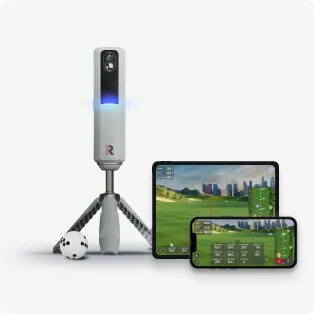
Two budget launch monitors. A hundred bucks apart. And they couldn’t be more different in how they work.
The Rapsodo MLM2Pro costs $700 and turns your iPhone into a launch monitor. The Blue Tees Rainmaker costs $599 and has its own built-in screen. One is a phone accessory that happens to track golf shots. The other is a standalone device that happens to be cheap.
Both are radar-based. Both claim 20+ metrics. Both work indoors and outdoors. And both are legitimate options if you’re trying to build a simulator without torching $2,000+ on a SkyTrak+.
They’re built for different humans. Pick wrong and you’ll either be frustrated by phone dependency or underwhelmed by software polish.
The Quick Version
| Rapsodo MLM2Pro | Blue Tees Rainmaker | |
|---|---|---|
| Price | $700 | $599 |
| Technology | Doppler radar + camera | Doppler radar |
| Needs a phone? | Yes — iPhone required | No (built-in 4.3“ display) |
| Android support | Limited | Yes (companion app) |
| Simulator software | Rapsodo Virtual Golf (subscription) | GSPro, E6 Connect (no subscription required) |
| Metrics | 20+ (with Premium sub) | 20+ (all included) |
| Battery | 5 hours | 7 hours |
| Weight | Fits in golf bag | Slightly larger, still portable |
| Outdoor use | Yes — excellent range tool | Yes — IPX4 water-resistant |
The table tells most of the story. But the details matter.
The iPhone Problem
This is the elephant in the room, so let’s deal with it first.
The Rapsodo MLM2Pro requires an iPhone. Not “works best with iPhone.” Requires it. The radar unit pairs with your phone, the phone’s camera captures swing video, and the Rapsodo app processes everything. No iPhone, no launch monitor.
If you’re an Android person, the MLM2Pro is a non-starter. Rapsodo added limited Android support in 2024, but it’s half-baked — missing features, delayed updates, and forum complaints that haven’t been resolved. The community consensus is clear: MLM2Pro is an iOS device.
The Blue Tees Rainmaker doesn’t care what phone you own. It has a built-in 4.3-inch TFT display that shows your core metrics — ball speed, launch angle, spin, carry distance — right on the device. You can pair it with the companion app for more detail, but you don’t have to. Turn it on, hit the ball, read the number.
For a home simulator build, this matters more than you’d think. If your iPhone is in the house and your simulator is in the garage, you don’t want to fetch your phone every time you want to hit balls. The Rainmaker just sits there, ready.
Accuracy: How Do the Numbers Compare?
Both are radar-based, which means both estimate spin from ball flight rather than measuring it directly with cameras. That’s the trade-off at this price — real spin measurement (photometric) starts at $699 with the Square Golf.
Rapsodo MLM2Pro accuracy: Decent for the price. Ball speed and launch angle are reliable within 2-3% of higher-end units. Spin numbers are estimated and can wander, especially with wedges — expect 500-800 RPM variance on short irons. The MLM2Pro uses a secondary camera to help with spin estimation, which gives it a slight edge over pure-radar budget units.
Blue Tees Rainmaker accuracy: Comparable. Ball speed and launch angle track well. Spin is also estimated, and users report similar variance to the MLM2Pro on wedge shots. The Rainmaker doesn’t have the secondary camera trick — it’s pure radar — but the algorithm is solid.
Honest assessment: neither of these is a Foresight GC3. If you need tour-level accuracy for club fitting, spend more. If you want to know if your 7-iron carries 165 or 172, both will get you close enough. The accuracy gap between these two is narrower than the price gap suggests.
Simulator Software: Where the Rainmaker Pulls Ahead
This is where the comparison gets lopsided.
Rapsodo MLM2Pro: The included Rapsodo app has a driving range mode and basic data. For simulator play — actual golf courses, not just a range — you need Rapsodo Premium at $99.99/year. That unlocks Virtual Golf with 5 courses. Five. And they’re not great-looking courses. The graphics are mobile-app quality, not GSPro or E6 quality.
You cannot connect the MLM2Pro to GSPro or E6 Connect. Rapsodo’s ecosystem is closed. You’re locked into their app, their courses, their subscription.
Blue Tees Rainmaker: Connects to GSPro and E6 Connect out of the box. No subscription required for core functionality. That means you get access to GSPro’s library of 100+ photorealistic courses (Pebble Beach, Augusta recreations, St. Andrews) for the cost of a GSPro license — $250 one-time, no recurring fee.
This is a massive difference. The Rainmaker is a real simulator input device. The MLM2Pro is a range tool with a golf game attached.
If you’re building a home simulator — even a budget one with a net and a laptop — the Rainmaker plugs into the same software ecosystem that $5,000 launch monitors use. The MLM2Pro doesn’t.
Portability and Outdoor Use
Both units are designed to go to the range. This is where the MLM2Pro shines.
Rapsodo MLM2Pro: It’s tiny. Smaller than a paperback book. Fits in any golf bag pocket. At the range, you set it down 6-8 feet behind the ball, open the app on your phone, and start hitting. The phone sits in a built-in stand on top of the unit. Swing video is captured automatically with data overlay — you can review every shot immediately. For range practice, this is the better experience.
Blue Tees Rainmaker: Also portable, but larger. Think paperback book vs. small hardcover. It fits in a bag but takes up more space. The built-in display means you can check numbers without looking at your phone, which is genuinely nice at the range. IPX4 water resistance means light rain won’t kill it.
For pure range sessions, the MLM2Pro’s phone integration and swing video make it the better range companion. For simulator use, the Rainmaker wins easily.
What About the Rapsodo’s Camera?
The MLM2Pro uses your iPhone’s camera in addition to radar. This gives it two things the Rainmaker doesn’t have:
- Swing video with data overlay — every shot is recorded with your numbers burned in. Great for sharing on social media or reviewing your swing.
- Spin estimation assist — the camera helps the algorithm guess spin direction, which marginally improves accuracy on well-lit shots.
These are real features. If you’re a range rat who loves analyzing swing video, the MLM2Pro’s camera integration is genuinely valuable. But for a home simulator build, swing video is a nice-to-have, not a must-have. You’re hitting into a screen, not filming for Instagram.
Battery Life
| MLM2Pro | Rainmaker | |
|---|---|---|
| Battery life | 5 hours | 7 hours |
| Charging | USB-C | USB-C |
| Swappable? | No | No |
The Rainmaker gives you two extra hours. Neither is swappable. For a 2-hour sim session, either is fine. For a full day at the range, bring a power bank.
The Subscription Question
This is a dealbreaker for some people. Let’s be clear:
Rapsodo MLM2Pro:
- Basic app (range data): Free
- Premium (Virtual Golf, advanced metrics): $99.99/year
- Without Premium, you lose simulator play and several advanced metrics
Blue Tees Rainmaker:
- All 20+ metrics: Included, no subscription
- Standalone practice modes: Included
- GSPro/E6 Connect: Requires separate software license (GSPro is $250 one-time)
- No recurring fee from Blue Tees
If you hate subscriptions — and based on forum research, a lot of you do — the Rainmaker is the obvious choice. “Buy once, cry once” is the dominant forum philosophy, and the Rainmaker respects that. The MLM2Pro holds your simulator play hostage behind a $100/year paywall.
Build Quality and Durability
Both units feel like $600 products, not $2,000 products. That’s not a knock — it’s a reminder that these are budget devices.
The MLM2Pro is plastic-bodied and light. It survives being tossed in a golf bag but won’t appreciate being dropped on concrete. The phone stand on top is the most fragile part — it’s a thin plastic arm that could snap if you’re careless.
The Rainmaker is heftier and feels more rugged. IPX4 rating means it handles splashes and light rain. The built-in screen is recessed and protected. It’s the more durable of the two for garage and outdoor use.
Who Should Buy What
Buy the Rapsodo MLM2Pro if:
- You’re an iPhone user (not negotiable)
- Your primary use is outdoor range practice, not home simulation
- You want swing video with data overlay
- You want something that fits in your golf bag pocket
- You don’t mind a $100/year subscription for simulator play
Buy the Blue Tees Rainmaker if:
- You’re building a home simulator (net + laptop + GSPro)
- You want standalone operation without phone dependency
- You want GSPro/E6 compatibility (the real simulator software)
- You refuse to pay a subscription
- You’re an Android user
- You want to save $100
The Verdict
For most people reading this site, the Blue Tees Rainmaker is the better buy. Here’s why: you’re here because you want a home golf simulator. The Rainmaker is a simulator input device. The MLM2Pro is a range tool that can also play golf.
The $100 you save on the Rainmaker buys most of a GSPro license. And GSPro gives you 100+ courses that look like actual golf courses, not mobile-app recreations. The MLM2Pro’s Rapsodo Virtual Golf gives you 5 courses that look like a 2012 video game.
The MLM2Pro is a great range tool. If you spend 90% of your time at an outdoor range and want swing video, it’s the right pick. But if you’re building a simulator in your garage — even a $800 budget build — the Rainmaker connects to the software you actually want to use.
Spend $599 on the Rainmaker. Spend $250 on GSPro. Get a net and a mat. You’ve got a real simulator for under $1,200.
Winner: Blue Tees Rainmaker — standalone operation, GSPro compatibility, no subscription, $100 cheaper. The MLM2Pro is the better range tool, but this site is about building simulators.
Looking for the full breakdown? Read our Blue Tees Rainmaker review and Rapsodo MLM2Pro review. Or check out our golf simulator under $500 guide for even cheaper options.
Need the full picture on costs? 5-Year Total Cost of Ownership → with software subscriptions, mats that wear out, and the hidden expenses nobody talks about.