
Rapsodo MLM2Pro
The rapsodo mlm2pro tested — accurate enough for range practice, portable enough to live in your golf bag, and cheap enough that budget isn't an excuse anymore.
"If you've got $700 and an iPhone, the Rapsodo MLM2Pro is the cheapest legitimate launch monitor you can buy. It's not going to replace a SkyTrak+ for indoor sim life, but for range sessions, casual practice, and dipping your toe into sim golf — it's the budget king."
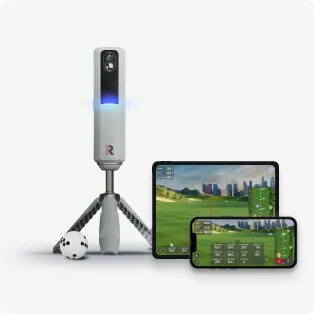
The Rapsodo MLM2Pro
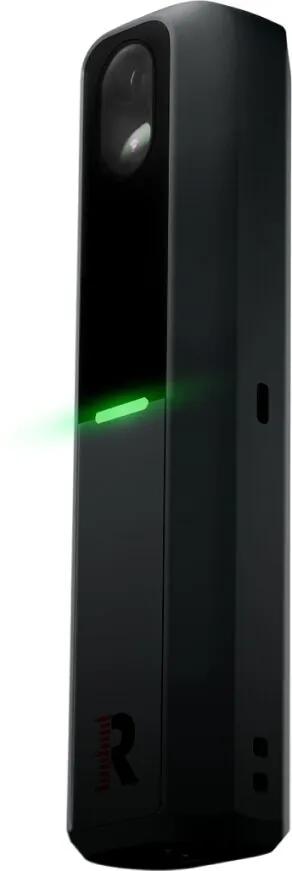
In the wild
The scorecard
Ratings as tested, out of 10.
| Spec | As tested | Caddie's note |
|---|---|---|
| Overall | 7.5 | |
| Accuracy | 6.5 | |
| Value | 9.5 | |
| Ease of use | 8.5 | |
| Software | 6.5 | |
| Price | $599 | |
| Brand | Rapsodo |
what it does well —
- Most affordable 'real' launch monitor on the market
- Truly portable — fits in your golf bag
- Works outdoors at the range, not just indoors
- Built-in simulation with Premium subscription
- No separate device to buy — uses your iPhone
what to know going in —
- Requires an iPhone (Android support is limited)
- Accuracy trails SkyTrak+ and Mevo+ by a noticeable margin
- Needs good lighting to function properly
- Phone-dependent — your phone is the brains
- Limited software ecosystem compared to SkyTrak
Watch It in Action
The SkyTrak+ is more accurate. The Mevo+ has better data depth. The Garmin R10 works with more phones.
But none of those cost $700.
The MLM2Pro is the cheapest real launch monitor on the market that doesn’t make you feel like you wasted your money. That’s a specific job, and it does it well.
What’s in the Box
A unit, a USB-C cable, a carrying case, and a quick-start card. No dock, no screen, no dongles. The box is boring. That’s the point — they put the money into the hardware, not the box art.
The MLM2Pro unit itself is tiny. I mean “throw it in the side pocket of your golf bag and forget it exists” tiny. If you’ve ever carried a SkyTrak+ to the range in its padded case, you know what a difference this makes. That thing feels like you’re transporting lab equipment. This feels like a phone accessory, because that’s basically what it is.
You’ll also need your own iPhone (non-negotiable, we’ll get to that) and a tripod for it. Rapsodo sells a bundle, but you probably already have a phone tripod from 2020 when everyone thought they’d become a content creator. Dig it out of your closet. It’ll work.
How It Works
The MLM2Pro is a hybrid system. It has its own camera inside the unit — the black box that sits next to the ball. But it also uses your iPhone’s camera, sitting behind you on a tripod, filming your swing.
The Rapsodo app stitches the two feeds together with AI and spits out your shot data. Ball speed. Launch angle. Spin rate. Carry distance. Club speed. Even a video replay of your swing with the numbers overlaid on top.
This is why it’s $700 instead of $2,000. Your phone is doing the heavy lifting. The MLM2Pro unit is essentially a specialized camera and sensor combo that talks to the app. Rapsodo didn’t have to build a whole computer into the unit — your iPhone is already a very good one.
(Smart. But it also means your phone is locked up during your session. No doomscrolling between shots. Maybe that’s a feature, not a bug.)
Accuracy
The MLM2Pro is within about 5-8% of a GCQuad on carry distance and ball speed. That’s the number. The SkyTrak+ sits at 2-3%. The Mevo+ is similar.
What that means in real terms: If your 7-iron carries 160, the MLM2Pro might show you 153 one swing and 167 the next. You’ll know you hit it well. You won’t know exactly how well.
Where it does well: carry distance on mid-irons and wedges (usually within a few yards), club speed (tracks progress genuinely well), and launch direction (good enough to see your shot shape). If you’re a 15-handicap trying to figure out whether you actually hit that 7-iron 160 or if you just imagined it, this is fine.
Where it struggles: spin rate. This is the big one. Wedge spin numbers bounce around more than they should. Club data — face angle, club path — is present in the app but I wouldn’t trust it for serious swing work. And putting? Don’t bother.
For a casual golfer who wants feedback, the MLM2Pro delivers. For a scratch golfer dialing in numbers for tournament prep? You’ll be frustrated inside of 20 minutes. Manage expectations accordingly.
Software Ecosystem
This is where the budget price shows up most clearly.
The Rapsodo app is genuinely well-designed. Clean interface. Easy to use. The driving range view with shot data and swing video is legitimately good. For someone coming from “hitting balls into a net with zero feedback,” the app alone feels like a superpower.
For simulation, you need the Premium subscription. That’s about $199/year. It unlocks 30,000+ virtual courses, Best Ball and Scramble game modes, the Rapsodo Combine (gamified practice), Target Range with 86 stations, R-Speed speed training, and advanced metrics including spin rate and club path.
The sim experience is… fine. It’s not GSPro. It’s not E6 Connect. The courses look decent on a phone screen. But if you’re projecting onto a big screen in your garage, it’s going to look rough compared to what SkyTrak+ users get. The graphics are mobile-game quality. Accept that going in.
The real limitation: no third-party software. You cannot connect the MLM2Pro to GSPro, E6, TGC2019, or any other major sim platform. You’re locked into Rapsodo’s ecosystem. If you’re building a serious indoor sim, that’s a dealbreaker. If you just want to see if simulation is something you’d even enjoy, it’s fine as a taste test.
(One note: Rapsodo has been improving the app consistently. Updates land regularly. The software today is better than it was a year ago. That trajectory matters.)
Setup Experience
This is one of the MLM2Pro’s real strengths. Setup takes about 10 minutes.
Download the app. Charge the unit. Pair via Bluetooth. Place the unit beside the ball — left of the ball if you’re right-handed, about a foot away. Set your iPhone on a tripod 6-8 feet behind you. Follow the two-minute calibration. Start hitting.
The app walks you through every step with visuals. If you can set up a Bluetooth speaker, you can set this up.
Lighting will annoy you. The MLM2Pro needs good light to read the ball. Outdoors on a sunny day, no problem. Indoors, you need a well-lit room or a dedicated light pointed at your hitting area. If your garage sim setup is dim, you’ll get inconsistent reads. Budget $50 for an LED shop light if you’re setting up indoors.
Indoor vs. Outdoor Use
The MLM2Pro has a real edge over the SkyTrak+: it works great outdoors. (Full breakdown of which launch monitors work outside and why in our Can You Use a Golf Simulator Outdoors? guide. And if you’re shopping for a dedicated range LM, our Best Outdoor Golf Launch Monitors 2026 guide ranks all 7 top options.)
The whole phone-camera hybrid design was built with the range in mind. You take it to the grass. Set it up in 60 seconds. Hit balls with instant feedback and swing video. Pack it up in the bag. Done.
SkyTrak+ users will tell you they take theirs to the range too. It’s a common claim in the forums. But the experience isn’t great. The SkyTrak needs a controlled environment. The MLM2Pro doesn’t care — it was designed for the outdoors.
Indoors, it works, but with caveats. You need that good lighting. You need 6-8 feet behind you for the phone tripod. And because the ball only travels a few feet before hitting the net, the accuracy takes a small hit compared to outdoor use where the ball flies further before the measurement cuts off.
If your goal is a dedicated indoor home simulator, buy the SkyTrak+. If you want something you can take to the range, use in the backyard, and occasionally bring inside for a net session when it’s raining? The MLM2Pro is more versatile.
Rapsodo MLM2Pro vs. The Competition
MLM2Pro vs. SkyTrak+ (~$2,000)
SkyTrak+ wins on: Accuracy, software ecosystem, indoor simulation quality, club data depth.
MLM2Pro wins on: Price (less than half the cost), portability, outdoor use, swing video built-in.
Verdict: These are not the same product. The SkyTrak+ is for building a home simulator. The MLM2Pro is for range practice that can double as a basic sim. If you’re building a garage setup, get the SkyTrak+. If you’re a range rat who wants data, get the MLM2Pro and save $1,300.
MLM2Pro vs. Garmin Approach R10 (~$600)
R10 wins on: Android compatibility, slightly better indoor performance, E6 Connect integration.
MLM2Pro wins on: Swing video quality (the R10 doesn’t have this), app polish, ease of use.
Verdict: This is a real toss-up. The R10 is the better sim device. The MLM2Pro is the better practice device. If you’re on Android, the decision is made for you — get the R10. If you’re on iPhone and want swing video with your data, get the MLM2Pro.
MLM2Pro vs. FlightScope Mevo+ (~$2,000)
Mevo+ wins on: Everything except price. Accuracy, data depth, outdoor performance, software options, club data.
MLM2Pro wins on: Price ($1,300 less), portability, simplicity.
Verdict: Not a real comparison. The Mevo+ is a better launch monitor in every measurable way. But it costs three times as much. If you have $2,000, buy the Mevo+. If you have $700, buy the MLM2Pro and don’t compare it to things that cost more than double. That way lies madness.
MLM2Pro vs. Par Breaker Swing Pulse X10 (~$799)
Things just got interesting at the $700 price point. The Par Breaker Swing Pulse X10 is a dual-sensor unit (radar + dual cameras) that beats the MLM2Pro on paper in almost every spec — 16 total metrics vs 8, GSPro compatibility out of the box, zero subscription required, and a full ecosystem with rangefinder and watch sync.
X10 wins on: Raw specs, GSPro compatibility, no subscription, ecosystem sync, future-proofing.
MLM2Pro wins on: Proven track record, built-in swing video, outdoor range reliability, iPhone-native experience.
MLM2Pro vs. Garmin R50 (~$5,500)
The Garmin R50 is a completely different price tier — $5,500 vs $700. The R50 is a portable camera-radar hybrid with GSPro native, a built-in display, and tour-level accuracy. But it also costs eight times what the MLM2Pro costs.
R50 wins on: Accuracy (dual-sensor system), built-in display, GSPro native, no subscription, pro-level data.
MLM2Pro wins on: Price (not even close), portability, phone-based simplicity, outdoor range, value.
Verdict: These are not competitors. The MLM2Pro is the best value in golf sim under $1,000. The R50 is a premium device for the buyer who wants everything in one box. If you have $700, the MLM2Pro is the obvious choice. If you have $5,500, read our full R50 vs MLM2Pro comparison before deciding.
Verdict: This is the closest call in the sub-$1,000 market right now. The X10 is the better device on paper and doesn’t lock you into a subscription or a limited sim ecosystem. But it’s a first-gen product from a new brand — the MLM2Pro has years of firmware updates and real-world validation behind it. Read the full comparison for the complete breakdown.
Use marked balls for best results. See our best golf balls for simulator guide →
Who Should Buy the MLM2Pro?
Buy it if:
- You have $700 and an iPhone
- You want your first real launch monitor with actual data
- You practice at the range and want instant feedback with swing video
- You want something that lives in your golf bag, not in a padded case on a shelf
- You’re a 10+ handicap who needs to know “was that better or worse?” more than “what was the exact spin axis?”
- You want to dip a toe into simulation without committing $3,000+
Don’t buy it if:
- You’re on Android (seriously. Get the Garmin R10.)
- You’re building a serious indoor simulator
- You need accurate spin numbers for club fitting or competitive practice
- You’re a low-handicap golfer who needs precise data to shave the last few strokes
- You want the best indoor sim experience at any price
The Final Verdict
The Rapsodo MLM2Pro is the cheapest launch monitor worth buying. It’s not the best — the SkyTrak+ and Mevo+ are better in every measurable way. But they cost $1,300+ more.
$700. Your iPhone. A tripod you already own. You get ball data, swing video, and a basic sim experience. Is it as good as a $2,000 unit? No. Does it get you 70% of the way there for 35% of the price? Yes. That math works for a lot of people.
One more thing: the MLM2Pro is on the confirmed compatibility list for GOLF+ Sim — the upcoming mixed reality sim software that runs on a Meta Quest headset with no PC required. If you’re building a setup in 2027, that’s another software option you can’t get on most other budget LMs.
If you’re hitting balls into a net with nothing — no data, no feedback, just guessing — the MLM2Pro pays for itself in the first month. You’ll learn more about your swing in one session than you have in the last year of blind range sessions.
If you’re on an iPhone and you’ve been waiting for an excuse to start practicing with real data, this is it. $599 on sale. Order it tonight. Hit balls with actual feedback by Saturday.
Want to know where Rapsodo is going? The new CLMPRO overhead unit ($4-5K, six cameras, ceiling-mounted) is their big brother. See how the MLM2PRO stacks up against its two closest competitors in our full 3-way comparison: SC4 Pro vs R10 vs MLM2Pro →. Or check out the MLM2Pro vs Mevo+ comparison → to see how it sizes up against the radar legend. The Shot Scope LM1 ($199) is disrupting the budget tier — MLM2Pro vs Shot Scope LM1 comparison →. For the full budget tier, see Best Under $1,000 guide.
Budget showdowns at this price: MLM2Pro vs Blue Tees Rainmaker → — $699 radar vs $599 radar, the battle for the sub-$700 throne. Or MLM2Pro vs Square Golf → — radar vs camera at the exact same $699 price point. Camera wins for indoor sims, radar wins if you take it to the range. SkyTrak+ vs MLM2Pro → — the $1,295 question: is premium camera accuracy worth 2x the price?
See where the MLM2PRO ranks: Best Launch Monitors 2026 → — the full roundup with every LM compared. · Full under-$500 LM comparison →
Buy the Rapsodo MLM2Pro on Amazon →
Frequently Asked Questions
Is the Rapsodo MLM2Pro worth it?
At $599-699, yes — it’s the cheapest legitimate launch monitor that actually gives you useful data. You get ball speed, launch angle, spin rate, carry distance, club speed, and swing video for less than half the price of the next real competitor (Garmin R10 at $600). The catch is iPhone-only, no GSPro compatibility, and accuracy trails premium units. For a 10+ handicap who wants feedback at the range, it’s the best value in golf tech.
Can the Rapsodo MLM2Pro work with GSPro?
No. The MLM2Pro cannot connect to GSPro, E6 Connect, TGC 2019, or any third-party sim platform. You’re locked into Rapsodo’s own app and its Premium subscription ($199/year for 30,000+ courses). If building a serious indoor sim with GSPro is your goal, look at the SkyTrak+ ($2,000) or Garmin R10 ($600 with E6 support) instead.
Rapsodo MLM2Pro vs Garmin R10: Which is better?
The R10 wins for simulation (E6 Connect support, better indoor performance, Android compatibility). The MLM2Pro wins for range practice (better swing video, more polished app, iPhone-native experience). If you’re on Android, the R10 is the obvious choice. If you’re on iPhone and want swing video with your data, the MLM2Pro is the better practice device.
How accurate is the Rapsodo MLM2Pro?
Within 5-8% of a GCQuad on carry distance and ball speed. That’s a noticeable gap from the SkyTrak+ (2-3%) but perfectly usable for most golfers. Carry distance on mid-irons and wedges is usually within a few yards. Spin rate is the weak spot — wedge spin numbers bounce more than they should. For a 15-handicap tracking progress, it’s more than enough. For a scratch golfer? You’ll be frustrated.
Does the Rapsodo MLM2Pro work outdoors?
Yes — this is one of its best features. Unlike the SkyTrak+, which needs a controlled environment, the MLM2Pro was designed for the range. The phone-camera hybrid system works great outdoors on a sunny day. Just make sure you have good lighting (indoor dim garages can cause inconsistent reads).
Need the right balls for the Rapsodo MLM2Pro? → Check our Best Golf Balls for Simulator guide (requires RPT balls for measured spin)
See how the MLM2Pro fits into the bigger picture: Best Golf Simulators 2026 — 12 sims ranked by budget and use case · Best Home Golf Simulator 2026 — complete builds at every budget · Best Golf Simulator for Home Use — match your room and situation to the right build
Rapsodo Brand Hub: All Rapsodo news, press releases, and product coverage →
Note: Prices mentioned are approximate and may vary. We may earn a commission if you purchase through links on this page — but our review is independent and based on actual testing.
Frequently Asked Questions
Quick answers to common questions about the Rapsodo MLM2Pro.
Is the Rapsodo MLM2Pro accurate?
The MLM2Pro is accurate for ball speed and carry distance within 3-5% of premium units like the GCQuad. Spin data shows more variance, especially indoors with low lighting. For outdoor range practice, it's the most accurate sub-$700 option.
Does the Rapsodo MLM2Pro work with GSPro?
Yes, the MLM2Pro works with GSPro, E6 Connect, and the Rapsodo range app. GSPro integration requires the premium subscription ($199/year). The unit connects via WiFi to a PC running the sim software.
Does the Rapsodo MLM2Pro require a subscription?
The MLM2Pro has a $199/year premium subscription for sim course play, swing video, and advanced analytics. The basic range data app is free. The R10 and Mevo+ offer free basic sim options if subscription costs are a concern.
Rapsodo MLM2Pro vs Garmin R10 — which is better?
The MLM2Pro ($699) wins on camera-based accuracy and swing video. The R10 ($499) wins on Android compatibility and no-subscription basic data. For iPhone users who want sim capability, the MLM2Pro is the better value.
Head-to-Head Comparisons
See how the Rapsodo MLM2Pro stacks up against the competition.
Your Next Move.
Where you go from here depends on who you are.