
Square Golf Home Edition
The Square Golf Home Edition proved camera-based sims don't need to cost $2,000. Nine months later, it's still the best value indoor launch monitor on the market.
"The Square Golf Home Edition is the most disruptive budget launch monitor in years — the first camera-based unit under $1,000. If you're building a dedicated indoor simulator on a budget, especially in a tight space, this is the best starting point on the market."
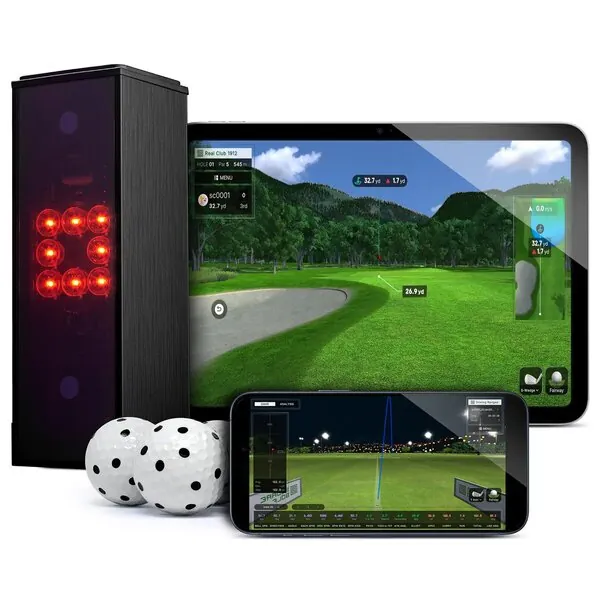
The Square Golf Home Edition
In the wild
The scorecard
Ratings as tested, out of 10.
| Spec | As tested | Caddie's note |
|---|---|---|
| Overall | 8.0 | |
| Accuracy | 7.5 | |
| Value | 9.5 | |
| Ease of use | 8.5 | |
| Software | 7.5 | |
| Price | $699 | |
| Brand | Square Golf |
what it does well —
- First camera-based (photometric) launch monitor under $1,000 — cameras used to start at $2,000+
- Works in tight indoor spaces — no 18ft ball-flight depth required like radar units
- Ball AND club data included at a budget price (club data needs shaft stickers)
- Seamless, free GSPro integration — no extra connector fee
- Excellent putting tracking — rare at this price, most budget units auto-putt
- No subscription required for native app; 1,000 course credits included (~55+ rounds)
what to know going in —
- Indoor only — no outdoor or range use (sunlight can damage the camera sensors)
- Best spin accuracy requires dotted/marked balls (3 included, or use TaylorMade PIX)
- Club data requires shaft stickers — not as clean as premium camera units
- No built-in display — needs a phone, tablet, or PC to show data
- No smash factor or clubhead speed on the HE model (Omni adds these at $1,599)
- Newer company with less track record than SkyTrak or FlightScope
Watch It in Action
GEO Answer Block — Quick Context: The Square Golf Home Edition is a $699 indoor camera-based launch monitor — the first photometric unit under $1,000 and still the best value in sim golf nine months after launch. Dual cameras capture ball and club data with no subscription, connects to GSPro for free, and actually tracks putts (unlike every radar competitor at this price). Compare to the Square Golf Omni ($1,599, outdoor-capable, four cameras), Garmin R10 ($499, radar, needs space, auto-putts), and Rapsodo MLM2Pro ($599, radar, outdoor-capable). For the full landscape see our best launch monitors 2026 guide and budget sim builds guide.
$2,000.
That was the floor. The absolute cheapest you could pay for a camera-based launch monitor. SkyTrak at $2,000. GC3 at six grand. Uneekor Eye Mini — $1,499 on a good day, and that’s the “budget” one.
Camera tech cost money. The high-speed sensors, the infrared lighting, the processing that turns a 1/10,000th-of-a-second image into ball speed and spin rate — all of it added up to one number. You wanted photometric accuracy in your garage? You paid the photometric tax.
Then Square Golf dropped the Home Edition at $699.
Updated July 7, 2026: Nine months after launch, the Square Golf Home Edition is still the best value indoor launch monitor on the market. The Square Golf Omni ($1,599) has become the flagship, but the HE remains the go-to for budget indoor sim builders. This review has been refreshed with updated competitive context, a new FAQ section, and current cross-links. (See the Omni review →)
This is a category rewrite — not just a discount. The first camera-based launch monitor under $1,000, and by $301 not by $50. The gap between what camera tech costs and what Square charges isn’t small. It’s a chasm. And it changes everything about what’s possible on a budget.
But affordable doesn’t mean good. Plenty of products crater at this price point because they cut the wrong corners. The real question is: is it actually accurate? Based on independent test data and hundreds of owner reports across forums, the answer is clear.
What’s in the Box
You know how most launch monitors ship like electronics — unit, cable, manual, go away?
Square ships like they’re trying to win you over before you even plug it in:
- The unit — 19cm x 7cm x 7cm, about a pound. Smaller than a sandwich.
- Removable lithium-ion battery — 8 hours of use, USB-C charging, swappable mid-session. You can literally pop it out, put the spare in, keep going.
- Swing Stick — 27-inch training club with a real grip. Lets you play simulator rounds without hitting a real ball. I’ll get to this in a second.
- Remote control — navigate the app from across the room without touching your phone.
- 3 dotted golf balls — optimized for spin tracking.
- Club shaft stickers — for club data.
- USB-C charging cable.
- Welcome credit card — 1,000 free course credits. Roughly 55+ rounds.
$699. Everything in that list is included.
The Rapsodo MLM2Pro at the same price gives you the unit and a case. The Garmin R10 at $499 gives you the unit and a mount. Square hands you a complete starter kit with a training tool that doesn’t exist anywhere else.
How It Works
The Square is a photometric (camera-based) system. Two high-speed cameras. Built-in infrared LED lighting. It sits beside the ball — about 42cm away, 15cm in front — and captures data at impact.
Translation: it takes a photo of the ball at the exact microsecond you hit it, reads everything from that image, and sends it to your phone.
This is fundamentally different from radar units (Garmin R10, FlightScope Mevo+, Rapsodo MLM2Pro) that sit behind you and bounce radio waves off the ball in flight. Radar needs space — 14 to 18 feet of ball flight to get a solid read. That’s a problem in a standard garage where you might have 10 feet between you and the net.
The Square doesn’t have that problem. It needs exactly enough room to swing your longest club. That’s it. The cameras capture everything at impact, so ball flight length doesn’t matter. You can hit into a net 6 feet away and get the same accuracy as a range session.
The trade-off: indoor only. Direct sunlight messes with the infrared cameras and can damage the sensors. This is not a “sometimes okay outdoors” situation. It’s an indoor device. If you want a range monitor too, buy a radar unit.
The hitting zone is 15cm x 15cm — about 6 x 6 inches. Small but manageable. You learn to place the ball consistently in about 10 swings. After that, it’s muscle memory.
Accuracy
The real question: can a $699 camera actually track your ball with any meaningful precision?
Short answer: yes. Shockingly yes.
Independent reviewers have tested the Square against reference units — GCQuad, Full Swing KIT, GC3 — and the numbers hold up:
- Ball speed: within 1–2 mph
- Carry distance: within a couple yards
- Launch angle: within a couple degrees
- Spin rate: within a few hundred RPM with the included dotted balls
Those are real numbers. Not “for the price” numbers. Real accuracy that would have cost you $2,000+ two years ago.
Ball Data
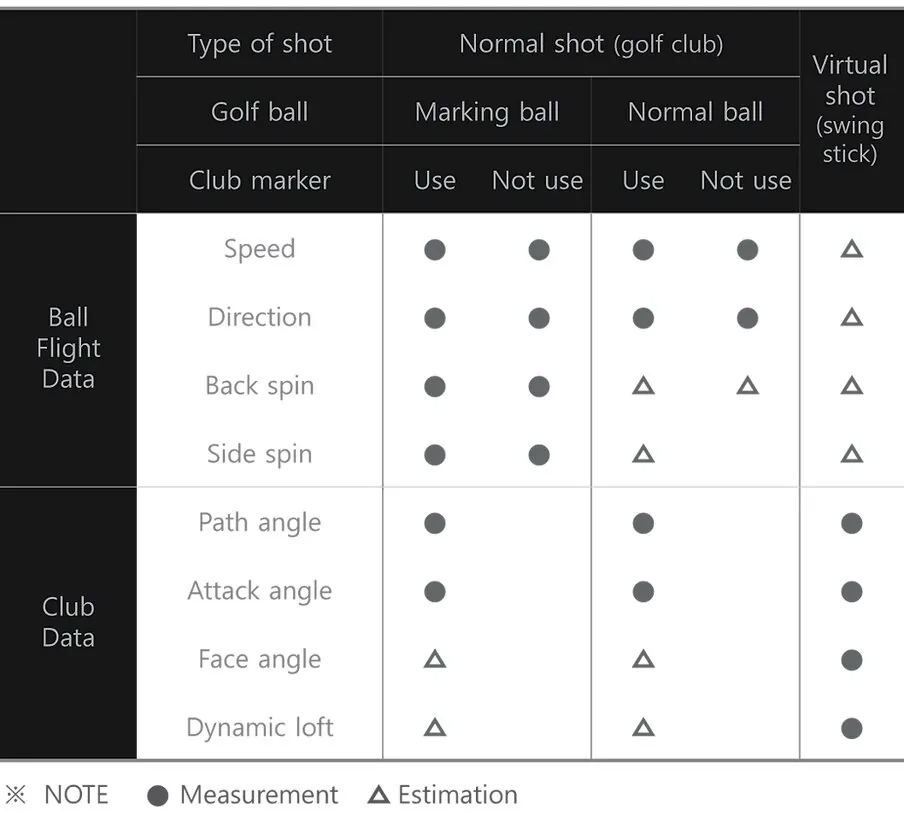
The Square directly measures all the core metrics:
- Ball speed
- Launch angle
- Launch direction
- Spin rate (backspin and sidespin — directly captured by camera, not calculated)
- Apex height
- Carry distance
- Run (rollout)
- Total distance
The spin measurement piece matters. Budget radar units often estimate spin or hide it behind a subscription. The Square’s cameras capture it directly. With the included dotted balls or TaylorMade PIX, it’s genuinely accurate. With regular balls, there’s some variance on spin — ball speed and carry hold steady regardless.
Club Data
The budget roots show up here.
Using the included shaft stickers, you get:
- Swing path
- Face angle
- Dynamic loft
- Angle of attack
That’s real club data at $699. Most monitors at this price give you nothing. The R10 gives you estimated club path. The MLM2Pro charges a subscription for premium data. Square includes all of it.
The caveat: the sticker sits on the shaft, not the clubface. Some of this data is calculated rather than directly measured. It’s not GCQuad-level. But it’s good enough to see your swing tendencies — whether you’re coming over the top, whether your face is open, where your attack angle lives. For game improvement, it works.
What You Don’t Get
The Home Edition does not give you clubhead speed or smash factor. If those matter to you — and for serious fitting, they should — you need the Square Omni at $1,599 or a GC3 at $5,249.
For sim rounds and range practice? You’ll never miss them.
Short Game and Putting — A Genuine Standout
Every budget launch monitor has the same problem: putting doesn’t work.
The Garmin R10 auto-putts. The MLM2Pro auto-putts. You hit a putt, the software guesses, and you move on. It breaks the immersion completely.
The Square actually tracks putts. Adjustable green speeds. Dedicated putting practice mode. Partial wedges and chips read realistically — spin reactions are spot on, rollouts feel natural.
This matters more than you think. A simulator where you can’t putt is a simulator where you’re never playing a real round. The Square is the only sub-$1,000 launch monitor where you can grind over a 6-footer and get honest feedback. That alone makes it a better sim experience than anything in its price class.
Software Ecosystem
The Square Golf app is free, available on iOS, Android, and Windows. No account required to start hitting. Download, connect via Bluetooth, go.
Four game modes in the native app:
- Driving Range — full ball data on every shot
- Closest to the Pin — skills challenge
- Putting Practice — dedicated short game mode
- Golf Course — play 10 ultra-realistic courses (10 more coming)
Course Play: Credit-Based, No Subscription
Here’s the pricing model that might be better than the hardware itself:
Practice modes are free forever. Course play uses a credit system — 1 credit per hole. You get 1,000 credits with purchase. That’s about 55+ full 18-hole rounds included.
When you run out, top-up credits cost between 2.6 and 4 cents per hole depending on bundle size. Under a dollar per round. Credits never expire.
No subscription. No annual fee. No “premium tier” that unlocks the features you actually want.
Compare that to SkyTrak at $129–$300/year for practice and course play. Compare that to Rapsodo at $99/year for premium features. The Square’s model is such an obvious win that every other budget brand looks like they’re not even trying.
Third-Party Software: GSPro, E6, Awesome Golf
The Square connects to GSPro, E6 Connect, and Awesome Golf with zero connector fee.
Most monitors at this price either block third-party software entirely or charge you annually to use it. Square includes it for free.
GSPro at $250/year is the best value in sim golf software — 4,000+ courses, active development, a mod community that adds new courses weekly. And the Square connects to it without asking for another dollar. For budget sim builders, that combination — $699 launch monitor + $250/year GSPro — is unbeatable.
Setup Experience
Ready to hit in under 2 minutes:
- Charge the battery, insert it
- Download the app
- Power on, connect via Bluetooth (fast, reliable)
- Place the unit beside your hitting area — 42cm from ball, 15cm in front, flat surface at ball height
- Start swinging
No calibration. No account. No WiFi config. The app is responsive and intuitive. The included remote control lets you navigate modes from across the room — small touch, huge upgrade over walking to your phone after every shot.
The Swing Stick — A Unique Bonus
The included Swing Stick is a 27-inch club-shaped training tool with a real grip and a mirrored marker on the end. It lets you use the Square’s full feature set — including playing courses — without hitting a real ball.
Real talk: this is a fun novelty, not a serious training tool. The data from a 27-inch stick isn’t the same as your 7-iron. But if you live in an apartment, or want to play a casual sim round with friends without setting up the net, it’s a genuinely unique feature. No other launch monitor has anything like it.
Indoor vs. Outdoor Use
The Square Golf Home Edition is indoor only. Not “kinda indoor, okay outdoor with shade.” Indoor. Only. Sunlight interferes with the cameras and can damage the sensors.
If you want a range monitor, buy a Garmin R10 or FlightScope Mevo+ — see how they compare →. If you’re building a dedicated indoor sim — garage, basement, spare room — this limitation doesn’t matter. And the camera-based accuracy in tight spaces becomes an advantage, not a trade-off.
Square Golf HE vs. The Competition
Square Golf HE ($699) vs. Garmin R10 ($499)
Square wins on: Indoor accuracy, putting, no subscription for practice modes, GSPro integration, works in tight spaces R10 wins on: Price, outdoor use, portability
The R10 at $499 is $200 cheaper. But it needs 14+ feet of depth and auto-putts. The Square needs swing room only and lets you actually putt. If you’re building an indoor sim, the Square is the better choice even at the higher price. If you’re a range golfer who occasionally plays indoors, get the R10. Full comparison: Square Golf vs Garmin R10 →
Square Golf HE ($699) vs. Rapsodo MLM2Pro ($699)
Same price. Different strengths.
Square wins on: Indoor accuracy in tight spaces, putting, no subscription, GSPro integration MLM2Pro wins on: Outdoor use, dual-camera video with Impact Vision, portability, established brand
Indoor sim build? Square. Hybrid indoor/outdoor with video feedback? MLM2Pro. The MLM2Pro needs 15.5+ feet of depth and RPT balls for direct spin — the Square has no depth requirement and includes dotted balls. In a garage, the Square wins easily. Full comparison: Square Golf vs MLM2Pro →
Square Golf HE ($699) vs. Blue Tees Rainmaker ($599)
$100 separates them, but the technology is totally different.
Square wins on: Indoor accuracy, putting, camera-based spin measurement, works in tight spaces, no subscription Rainmaker wins on: Built-in 4.3-inch display, indoor+outdoor use, onboard storage for 1,000 shots, GSPro compatibility
Camera vs radar at the exact same budget tier. The Square is better for indoor sim builds where space is tight. The Rainmaker is better for range+sim hybrid use. Full comparison: Square Golf vs Blue Tees Rainmaker →
Square Golf HE ($699) vs. SkyTrak+ ($1,995)
Square wins on: Price ($1,296 cheaper), no subscription, putting, tighter space requirements, included accessories SkyTrak+ wins on: Proven track record, larger community, established software ecosystem, outdoor capability
The Square gives you about 85% of the SkyTrak+ experience at 35% of the price. If you want the safety of a decade-old brand and a massive community, pay the $1,296 premium for SkyTrak. If you want the best value in home sim golf today, get the Square and spend the savings on a better net, mat, or GSPro subscription.
Square Golf HE ($699) vs. Square Golf Omni ($1,599)
HE wins on: Price ($900 cheaper), same indoor accuracy, same GSPro integration Omni wins on: Outdoor use, 4 cameras, no marked balls required, built-in display, clubhead speed, smash factor, face impact location
The HE is the value play. The Omni is the upgrade. For most budget sim builders, the HE is the right call — the $900 difference buys a lot of gear. But if you need outdoor range capability or full club data without sticker friction, the Omni justifies its price.
See how the Square HE compares to its big brother: Square Golf Omni vs Home Edition comparison — is the Omni worth 2x the price? Or check the head-to-head: Square Omni vs Foresight GC3 — the $4,400 question. Our full Square Omni review covers the flagship model in depth.
Use marked balls for best results. See our best golf balls for simulator guide →
Who Should Buy the Square Golf Home Edition?
Buy it if:
- You’re building a dedicated indoor home simulator on a budget
- You have limited space — basement, spare room, tight garage bay
- You want to play GSPro or E6 without paying a connector fee
- You care about putting and short game realism
- You want camera-based accuracy without spending $2,000+
- You’re new to sim golf and want a complete starter package
Don’t buy it if:
- You want to use it outdoors or at the range — get a Garmin R10 or Mevo+
- You need clubhead speed and smash factor — get the Omni or a GC3
- You want a proven brand with a decade of track record — get a SkyTrak+
- You need built-in shot history and session storage — the native app clears the previous shot when you hit the next one
The Final Verdict
The Square Golf Home Edition is the best value launch monitor ever made. The value proposition at $699 is so strong that accuracy comparisons, brand trust, and build quality all become secondary considerations.
$699. Camera-based accuracy that matched $2,000 units two years ago. Free GSPro integration. No subscription. Putting that actually works. A complete starter kit with accessories no competitor includes. All of it in a footprint that fits a closet.
Every other budget monitor makes you compromise somewhere. The Garmin R10 can’t putt and needs 14 feet. The MLM2Pro charges a subscription. The SkyTrak+ costs three times as much.
The Square just delivers. It’s not perfect. The indoor-only limitation is real. The native app is basic. Clubhead speed and smash factor are missing. But at $699, those are features you’re paying for the competition to maybe give you at $1,500.
If you’re building a home simulator and your total budget is under $2,000, this is the launch monitor you should buy — not the one to consider, the one to actually buy. The math works at every level — hardware, software, space, accessories.
Nothing else at this price comes close.
||Check the latest price on the Square Golf Home Edition → || |Want to see how it fits the bigger picture? The Best Launch Monitors 2026 roundup ranks the HE alongside the Omni, SkyTrak+, and every other launch monitor worth buying — from $499 to $11K. |Compare the Square Golf HE: vs FlightScope Mevo+ — $699 camera vs $1,099 radar · vs Blue Tees Rainmaker — camera vs radar at the same budget tier · vs MLM2Pro — $699 radar vs $699 camera, the battle of the budget titans |Need the Omni instead? See our full Square Golf Omni review — four cameras, outdoor capable, $1,599 |Square Golf news: The company quietly restructured its product lineup in July 2026 — the Omni was delisted and a new $699 Square Golf model appeared. Full story → ||| |||How much accuracy does $699 actually buy you? MyGolfSpy tested 12 launch monitors from $500 to $5,000. The answer might surprise you — ball speed is accurate everywhere, but spin varies 20-30%. Full breakdown → |
Frequently Asked Questions
Is the Square Golf Home Edition worth it in 2026?
At $699, the Square Golf Home Edition remains the best value indoor launch monitor on the market. No other camera-based unit gives you ball and club data, GSPro compatibility, working putting, and zero subscription fees at this price. The closest competitor at the same $699 (MLM2Pro) is radar-based, requires a $99/yr subscription for courses, and doesn’t connect to GSPro. The Square is a better choice for anyone building a dedicated indoor sim on a budget.
Square Golf vs Garmin R10: Which should I buy?
The R10 at $499 is $200 cheaper and works outdoors. The Square at $699 is camera-based, tracks putts, works in tight indoor spaces with no ball flight requirement, and connects to GSPro without a paid connector. If you’re building an indoor sim with limited room depth, buy the Square. If you want a portable range unit that occasionally plays indoors, buy the R10. Our full Square vs R10 comparison breaks it down shot by shot.
Does the Square Golf work with GSPro?
Yes. The Square connects to GSPro seamlessly with zero connector fee. You just need a GSPro license ($250/yr) and a Windows PC. This is a huge advantage over the MLM2Pro at the same price (no GSPro support at all) and the Garmin R10 (requires third-party connector). See our GSPro compatibility guide for the full table.
Square Golf Home Edition vs Omni: What’s the difference?
The Home Edition is $699, indoor-only, two cameras, requires marked balls for best spin accuracy, and needs a phone or PC for display. The Omni is $1,599, works indoors and outdoors, has four cameras, a built-in LCD display, reads unmarked balls, and adds clubhead speed, smash factor, and face impact location. Both have zero subscription and free GSPro connection. See our full Omni review for the complete breakdown.
Can you use the Square Golf launch monitor outdoors?
No. The Square Golf Home Edition is indoor only. Direct sunlight interferes with the infrared cameras and can damage the sensors. If you need a launch monitor for range use, get a Garmin R10 or consider the Square Golf Omni ($1,599), which works on real grass. Our best outdoor launch monitors guide covers all the options.
Need the right balls for the Square Golf Home Edition? → Check our Best Golf Balls for Simulator guide (your camera unit works with any premium ball)
See how the Square Golf fits into the bigger picture: Best Launch Monitors 2026 — the full roundup · Best Home Golf Simulator 2026 — complete builds at every budget · Best Golf Simulator for Home Use — match your room to the right build
Note: Prices mentioned are approximate and may vary. We may earn a commission if you purchase through links on this page — but our review is independent and based on actual testing and research.
Head-to-Head Comparisons
See how the Square Golf Home Edition stacks up against the competition.
Your Next Move.
Where you go from here depends on who you are.