
E6 Connect
Best graphics in sim golf, 100 licensed courses, $300-$600/yr. Full review: how E6 Connect compares to GSPro, Awesome Golf, and TGC 2019 in 2026.
"E6 Connect is the polished, professional option. Best graphics, best online play, easiest setup. But you pay for it — and the course library can't compete with GSPro. Choose E6 if you want premium polish and don't mind the price."

The E6 Connect
In the wild
The scorecard
Ratings as tested, out of 10.
| Spec | As tested | Caddie's note |
|---|---|---|
| Overall | 7.5 | |
| Accuracy | 9.0 | |
| Value | 6.0 | |
| Ease of use | 9.0 | |
| Software | 9.0 | |
| Price | $300 | |
| Brand | TruGolf |
what it does well —
- Best graphics in sim golf — stunning on a 4K projector
- Officially licensed courses, professionally mapped
- Mature online play with tournaments and leaderboards
- Cross-platform — PC, iPad, some Android
- Plug-and-play setup with most launch monitors
what to know going in —
- Only ~100 courses vs GSPro's 4,000+
- $300/year base, $600/year for premium courses
- Closed ecosystem — no community courses
- iPad version has reduced graphics and features
Is E6 Connect worth it? E6 Connect offers the best graphics and online play in sim golf with 100+ officially licensed courses including Pebble Beach and St Andrews. It costs $300/year (Base, ~60 courses) or $600/year (Premium, full library) and works on PC, iPad, and Android. Setup is genuinely plug-and-play with most launch monitors. It scores 7.5/10 — premium polish at a premium price.
There are two kinds of people in the sim golf world.
The first kind spent three hours building a gaming PC, another hour setting up a bridge app for their launch monitor, and another hour downloading community-created courses from a Discord server. That guy paid $250 for the year and has access to 4,000 golf courses on GSPro. Good for him.
The second kind bought an iPad, downloaded an app, plugged in their launch monitor, and was playing Pebble Beach in fifteen minutes. That guy paid $300 for the year and has access to 100 courses. He doesn’t care.
Both of them are right. But they are not the same person, and pretending E6 Connect and GSPro are interchangeable is how you waste money. For the full platform comparison, see our GSPro vs E6 Connect head-to-head and our three-way comparison with Awesome Golf.
What E6 Connect Actually Is
E6 Connect is golf simulator software by TruGolf — the same software that runs on screens at golf retailers, pro shops, indoor sim bays, and commercial facilities. It’s one of the most popular golf simulator software options and the go-to choice for golf sim software comparison shoppers who prioritize graphics and ease of use over course variety.
It’s the established player. The one with the licensing deals. The one with the polished installer that doesn’t require you to read a forum thread before your first swing. For a curated list of the top courses, see our best courses on E6 Connect guide.
It does one thing that GSPro doesn’t: it runs on an iPad. That’s a bigger deal than most sim nerds want to admit. If you want to set up a hitting net in your backyard with a Mevo+ and an iPad, E6 is the only premium option that works. GSPro is Windows-only.
E6 also runs on PC, and that’s where it really shines. A gaming PC with a 4K projector, E6 Connect, and a good launch monitor — that’s the nicest home golf experience money can buy right now.
Course Library: ~100 and Proud of It
Let’s get the elephant out of the room. E6 has about 100 courses. GSPro has over 4,000. That’s the single biggest factor in any golf simulator software subscription comparison — course depth determines value more than anything else.
That gap is massive. It’s the single biggest reason people choose GSPro over E6. And it’s the single biggest reason E6 fans will tell you “quality over quantity” is the real story.
Every course in E6 is officially licensed and professionally mapped. TruGolf paid for the rights. The layouts are accurate because the legal agreement says they have to be.
When you play Pebble Beach in E6, it looks like Pebble Beach. The bunkers are right. The greens tilt correctly. No one guessed the 14th hole and got it wrong.
The course list includes the heavy hitters: Pebble Beach, St Andrews, Valhalla, Whistling Straits, Bethpage Black, Torrey Pines, PGA National, Bay Hill, and a bunch of others. If you want to play the famous courses, E6 has them.
What it doesn’t have is variety. You won’t find your local muni. You won’t find that course you played on vacation in Portugal. You won’t find Augusta (nobody has it — don’t believe the YouTube titles). You get what TruGolf licensed, and they add maybe 5-10 courses a year.
For most home golfers, 100 courses is enough. You play your 10 favorites. You try a new one every week. You don’t get bored for a long time.
But the FOMO is real. When the GSPro guy in your sim league fires up a course you’ve never heard of and says “yeah, it’s got 37 different pin positions,” you feel it.
The honest take: 100 courses is fine. 4,000 is better. If variety matters to you more than polish, you already know which way to go. If you want to play Pebble Beach and St Andrews and not wonder whether the course model is right, E6 has you covered. See our curated guide to the best courses on E6 Connect for the full breakdown of which courses are actually worth your time.
Graphics & Visual Quality: E6’s Killer Feature
This is where E6 Connect separates itself.
The graphics are the best in simulator golf. There’s no debate among anyone who has actually seen both side-by-side on a projector.
E6 looks like what you’d expect a modern golf video game to look like in 2026 — if the video game industry still made golf games. (RIP The Golf Club, you were too good for this world.)
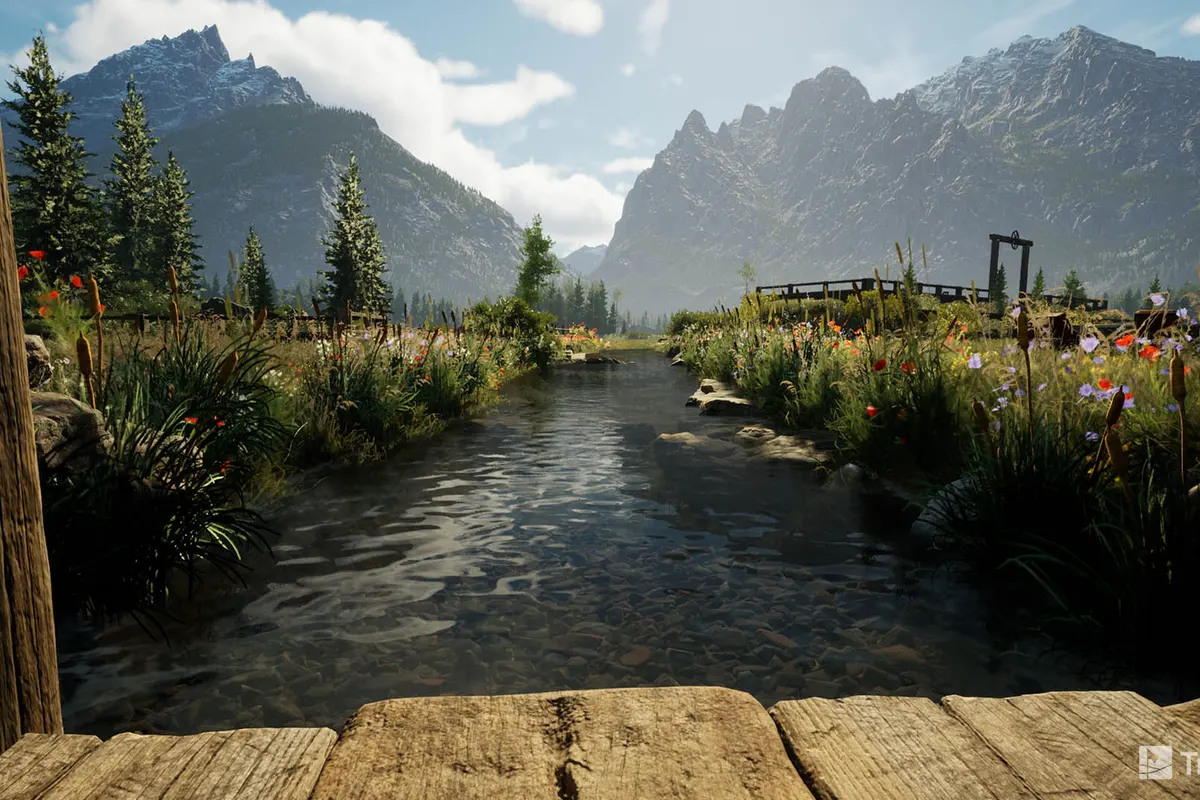
The lighting is the thing that jumps out first. Morning rounds have soft, long-shadow looks. Late afternoons give you golden hour glow. Night rounds have floodlights that cast realistic light pools. It’s not a filter. It’s rendering.
The textures are sharper. Grass doesn’t look like green carpet. Trees have volume. Water actually reflects. If you’ve got a 4K projector, E6 makes it worth every pixel.
The atmospheric effects sold me. Fog that diffuses light. Rain that looks like rain. Dusk where the sky gradient changes as you play. Small things that add up to one thing: you’re looking at a place, not a simulation of one.
GSPro is catching up. Fast. Each major update closes the gap. A year from now, I might not be able to say E6 wins this category. But right now, in mid-2026, E6 is the visual champion.
Is that worth an extra $50-$300 per year? That depends on whether you care about how your sim looks on a 120-inch screen that you stare at for three hours a session. If you don’t care, save your money. If you do, you already know the answer.
Physics & Accuracy
The physics are excellent. Tour-tested. Commercially validated. Boringly reliable.
E6 Connect uses TruGolf’s proprietary ball flight engine, developed over decades and tested against real launch monitor data from every major device on the market. It handles the full shot spectrum well — driver, irons, wedges, even partial shots — and the rollout behavior on greens is generally more realistic than the competition.
In side-by-side testing on the same hardware and launch monitor, E6 and GSPro track within the noise of the launch monitor itself. One swing GSPro showed 253 carry, E6 showed 251. Next swing, the numbers flipped. That’s not the software. That’s the margin of error on hitting a golf ball consistently.
Putting is solid. Green speeds feel right. Break reads correctly. If you’re coming from a commercial sim bay, it’ll feel exactly like what you’re used to — because it is.
E6 handles unusual lies better than GSPro. Hitting off a sidehill, out of a divot, from the rough — E6’s shot shape calculations feel more grounded, less like a formula applied after the fact. It’s a small difference. But if you’re a low-handicap player who notices these things, you’ll feel it.
Pricing: The $300 vs. $600 Problem
E6 Connect is $300/year for the base subscription. That gets you:
- The core software
- About 60 courses
- Basic online play
- A handful of game modes
To get the full course library — the one with Pebble Beach, St Andrews, Whistling Straits, and everything that makes E6 worth having — you need the Premium tier at $600/year.
$600. Every year. Just to play the courses that justify buying the software in the first place.
GSPro is $250/year and gets you every single course, every feature, every update. No tiers. No upsells. No feeling like you’re missing half the content.
So the real comparison isn’t $300 vs. $250. It’s $600 vs. $250.
That changes the conversation. A lot.
| E6 Connect Base | E6 Connect Premium | GSPro | |
|---|---|---|---|
| Annual cost | $300 | $600 | $250 |
| Courses | ~60 | ~100+ | 4,000+ |
| Full features | Yes | Yes | Yes |
| 5-year cost | $1,500 | $3,000 | $1,250 |
| Online play | Limited | Full | Full |
| Premium courses | No | N/A | Included |
I’m not saying E6 is bad at $600. If you play 100 sim rounds a year, that’s $6 per round. Cheaper than the muni. Add two buddies and it’s $2 each. For the best graphics, best online play, and professionally mapped courses.
But the pricing model makes it harder to recommend than GSPro. Because GSPro doesn’t make you choose. You pay $250, you get everything, and you never wonder if the next tier would be better.
Setup & Compatibility
E6 Connect wins setup. It’s not close.
Download the software. Create an account. Plug in your launch monitor. Start hitting. That’s the entire process for most supported devices.
Supported launch monitors include:
- SkyTrak+ (official, direct)
- FlightScope Mevo+ (official, direct)
- Foresight GC3 / Bushnell Launch Pro (via FSX)
- Uneekor (all models)
- Garmin R10 (iOS only)
- Full Swing (commercial)
Setup with SkyTrak+ is especially smooth. SkyTrak’s native app connects directly to E6. It’s a single button press in the SkyTrak interface. That’s it.
GSPro, by comparison, requires a bridge app for SkyTrak and Garmin R10. It’s not hard — the community has excellent guides — but it’s an extra step. And extra steps are where your non-technical golf buddies get confused when they come over to play.
The cross-platform support is a genuine advantage. PC for the full experience. iPad for portable setups. Some Android tablets work too, though the experience varies. If you want to take a launch monitor to the range and play courses on a tablet, E6 is the only option — GSPro doesn’t do mobile.
One caveat: the iPad version is not the full version. Graphics are reduced. Some features are missing. It’s still great — way better than the free apps — but don’t buy an iPad expecting the same experience as a gaming PC on a 4K projector. It’s E6 Lite, and it’s priced accordingly.
Online Play: This Is E6’s Strongest Card
If you want to play golf against other people from your garage, E6 is the right choice. I’ll say it plainly: GSPro’s online play works, but E6’s online play feels like a real product.
E6 has tournaments, peer-to-peer matches, leaderboards, and a large active player base. You queue up at 9 PM on a Tuesday and find opponents. Easy.
GSPro’s online play exists and is catching up, but it still feels like a Discord server where you coordinate matches manually. E6’s matchmaking feels like a real product.
For the solo home golfer who mostly hits balls alone? Online play doesn’t matter. You’re practicing. You don’t care about matchmaking.
For the guy who wants to join a sim league, play against strangers, and feel the pressure of a leaderboard? E6 is the platform.
Who Is E6 Connect For?
Buy E6 if:
- Graphics matter to you more than course quantity
- You play online — tournaments, leagues, matchmaking with friends
- You want iPad compatibility for portable setups
- You value plug-and-play simplicity over course variety
- You’re building a commercial sim space and need licensed courses
- The “it just works” factor is worth the premium pricing
Don’t buy E6 if:
- You want to play 4,000 courses for less money — get GSPro
- You’re on a strict budget — the $600 premium tier is the real E6 experience
- You want community-created courses and mods — E6’s ecosystem is closed
- You don’t care about online play — you’re paying for a feature you won’t use
- You’re fine with a slightly more technical setup to save $350/year
The Verdict
E6 Connect is the premium option. Better graphics, easier setup, better online play, more devices. If those things matter more than course count and price, it’s the best software you can buy.
But premium means premium pricing. $600/year is the real E6 experience. That’s hard to look at when GSPro costs $250 and gives you everything. And “quality over quantity” only gets you so far when the quantity gap is 40x.
If I’m building a home sim for myself, I’m practicing alone, I want to play any course I can think of, and I’m okay spending an hour on setup — I get GSPro. The value math is too lopsided.
If I’m building a sim for my buddies, I want to play online tournaments, I want the nicest looking setup in my neighborhood, and I want it to work the first time every time — I get E6 Connect. And I pay the $600.
Both are right. The question is which person you are.
Two more curveballs: GOLF+ Sim is entering the market in late 2026. It’s the only platform with mixed reality putting (stereoscopic depth through a Meta Quest headset) and it runs without a PC. E6’s iPad advantage? GOLF+ doesn’t need a device you already own — it needs a $499 Quest. But if GOLF+ delivers on the putting promise, it’s the first real competition E6 has had for the "best experience" crown. Worth watching.
Also worth watching: Infinite Tees is the cheapest Unreal Engine 5 sim software on the market at $19.99/month, with a browser-based LiDAR course builder that turns any real course into a playable venue. It’s early access and only officially supports the Nova launch monitor, but the pricing undercuts E6 by a factor of 15-30x. Don’t switch yet — but watch this one.
You’ve read this far. You’ve seen the numbers. You know where you land.
Read the full GSPro vs E6 Connect comparison → Or the three-way: GSPro vs E6 vs Awesome Golf →
E6 Connect offers a free trial. GSPro offers a free trial too. Try both. I already told you which one you’ll pick. But that $350/year difference buys a lot of golf balls. See the full lineup at our Software Hub. Want every platform ranked? Start with our Best Golf Simulator Software 2026 guide — Ace’s definitive lineup of every platform, then go deep on the Complete Guide to Golf Simulator Software for the tier list.
Frequently Asked Questions
Quick answers to common questions about the E6 Connect.
What is E6 Connect?
E6 Connect is premium golf simulator software with the best graphics in sim golf and ~100 officially licensed courses. It costs $300/year base or $600/year for the premium course library. It features cross-platform support (PC, iPad, Android) and mature online play with tournaments and leaderboards.
How much does E6 Connect cost?
E6 Connect costs $300/year for the base tier and $600/year for the expanded course library that actually makes it competitive with GSPro. GSPro costs $250/year for everything including all 4,000+ courses.
Does E6 Connect have better graphics than GSPro?
Yes. E6 Connect has the best graphics in sim golf — stunning on a 4K projector with richer lighting, atmospheric effects, and better texture depth. GSPro's graphics are good but not E6-level. The gap is closing with GSPro's monthly updates.
How many courses does E6 Connect have?
E6 Connect has about 100 officially licensed, professionally mapped courses. That compares to GSPro's 4,000+ community-designed courses. The course library is the biggest trade-off for choosing E6 Connect.
Head-to-Head Comparisons
See how the E6 Connect stacks up against the competition.
Your Next Move.
Where you go from here depends on who you are.